
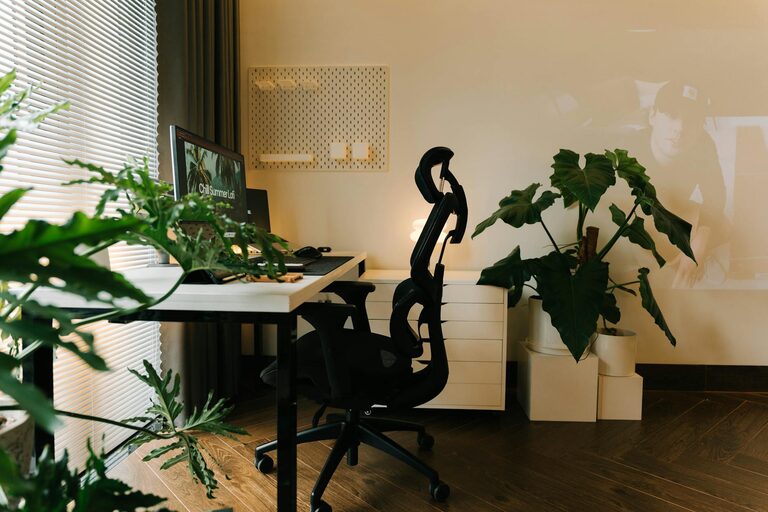
Creating a home office that feels cozy while boosting productivity can be a real game-changer for your daily work routine. Whether you’re working remotely full-time or occasionally, the right environment can help you focus, reduce stress, and enjoy your tasks more. In this guide, we explore simple and effective ways to design a home office that works well for you.
Why a Cozy and Productive Workspace Matters
A well-designed office space influences how you feel and perform during your work hours. Comfort helps reduce physical strain, while a clutter-free, organized setting minimises distractions and keeps your mind clear. Balancing these factors means you can stay motivated and efficient throughout your day.
Choosing the Right Location
Find a Quiet Area
Choose a spot in your home where noise and interruptions are minimal. This might be a spare room, a corner of a bedroom, or even a nook near a window.
Consider Natural Light
Natural light is beneficial for mood and alertness. Position your desk near a window if possible. If natural light is limited, invest in quality lighting that mimics daylight.
Furniture and Ergonomics
Invest in a Comfortable Chair
A supportive chair that encourages good posture is key. Look for adjustable chairs with lumbar support.
Desk Height and Space
Choose a desk with enough surface area for your computer and essential items, without being overcrowded. Adjustable desks or standing desks can add flexibility to your setup.
Monitor and Keyboard Positioning
Place your screen at eye level and keep your keyboard and mouse within easy reach to avoid strain.
Personalize Your Space for Comfort
Use Soothing Colors
Neutral or soft tones create a calming atmosphere. Pops of color can be added with accessories like cushions, rugs, or plants.
Add Textiles
Soft cushions, throws, or a comfortable rug add warmth and make your workspace inviting.
Incorporate Plants
Plants improve air quality and bring a refreshing touch, promoting wellbeing.
Organizing for Efficiency
Declutter Regularly
Keep only what you need within reach. Use drawers, shelves, or storage boxes to manage paperwork and supplies.
Use Vertical Storage
Wall shelves or pegboards save desktop space and help keep things organised.
Cable Management
Use clips or sleeves to gather cables neatly and avoid tangles.
Enhance Focus and Minimise Distractions
Noise Control
If your area is noisy, consider noise-cancelling headphones or white noise machines.
Set Boundaries
Inform family members or roommates about your work hours and the importance of limiting interruptions.
Minimal Digital Distractions
Use tools or apps that limit notifications during focused work periods.
Lighting Tips for Different Tasks
Layer Your Lighting
Combine ambient, task, and accent lighting to provide enough illumination without glare.
Adjustable Desk Lamps
Flexible lamps allow you to target light where you need it most, ideal for reading documents or detailed work.
Establish a Routine and Break Area
Define Work Hours
Having a clear schedule helps separate work from personal time, enhancing productivity.
Create a Separate Rest Spot
If space allows, have a comfy chair or corner nearby where you can take breaks or stretch.
Final Thoughts
Designing a home office that balances comfort with productivity doesn’t have to be complicated or expensive. By choosing the right location, investing in ergonomic furniture, personalising the space, and keeping things organised, you can build a workspace that not only feels good but also helps you achieve more. Remember, the best home office is one tailored to your habits and needs!
—
Try some of these tips today and watch your home office become a place where you enjoy working and produce your best results.